
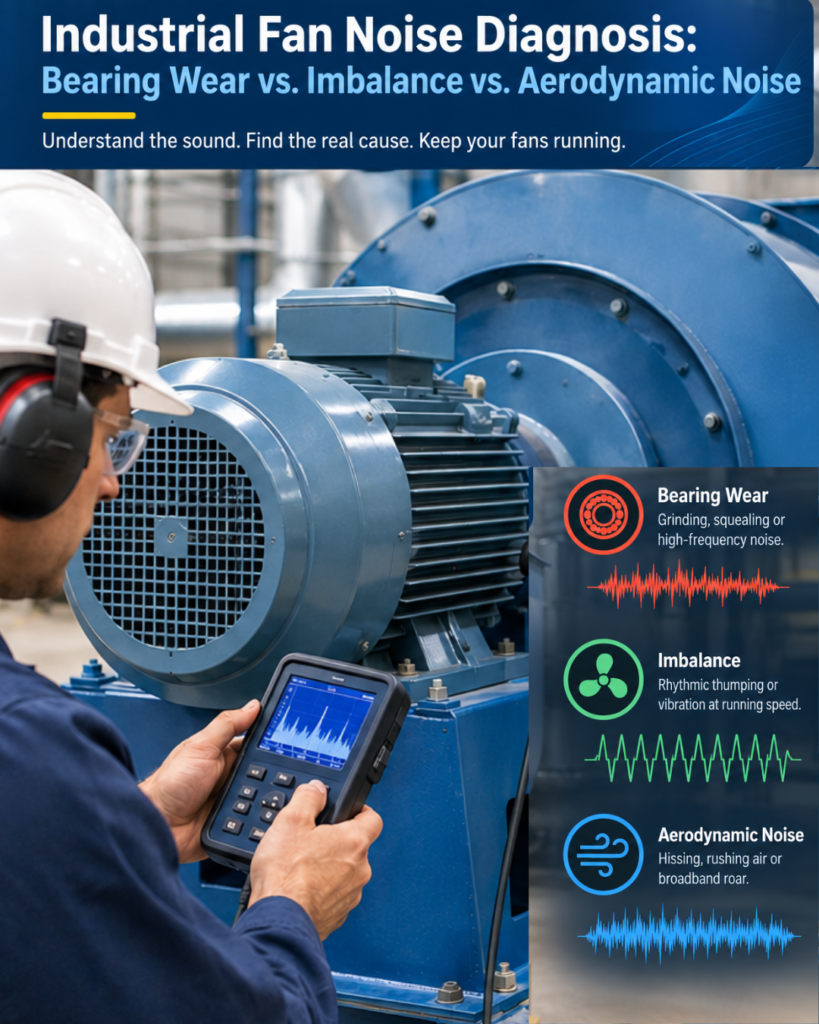
A fan that has been running quietly for years can suddenly start making a grinding sound, a rhythmic thump, or a loud rushing noise. The natural reaction is to assume that the bearing is failing.
Sometimes it is. But not always.
Industrial fan noise generally comes from three areas: bearing problems, mechanical imbalance, or airflow-related issues. The important part is identifying which one you are dealing with before starting the repair.
Replacing a bearing won’t fix an unbalanced impeller. Balancing the impeller won’t solve turbulence caused by a restricted duct. And if the fan is simply operating outside its intended airflow conditions, replacing mechanical components may do nothing to reduce the noise.
The sound itself can provide the first clue. Vibration, temperature, airflow, and static pressure measurements can then help confirm the actual cause.
This guide looks at the three common causes of fan noise and the practical checks maintenance teams can use to distinguish between them.
Why Is My Industrial Fan Making Noise?
Noise is often one of the first signs that something has changed in a fan system.
A fan that suddenly becomes louder may be experiencing increased vibration, bearing wear, material buildup on the impeller, airflow restriction, or another operating problem. Leaving the issue unattended can turn a relatively simple maintenance job into an unplanned shutdown.
Bearing wear, imbalance, and aerodynamic problems tend to produce different combinations of sound, vibration, and operating behaviour. Understanding those differences makes troubleshooting much faster.
Bearing Wear vs. Imbalance vs. Aerodynamic Noise
Cause | What It Usually Sounds Like | When It Is Most Noticeable | Best Way to Check |
Bearing wear | Grinding, squealing, clicking or knocking | Often becomes more noticeable as temperature or load increases | Vibration analysis, temperature and sound |
Imbalance | Rhythmic thumping or strong mechanical vibration | At running speed and often increasingly noticeable at higher RPM | Vibration measurement and impeller inspection |
Aerodynamic noise | Hissing, rushing air, whooshing or tonal whine | Often increases with airflow, speed or system restriction | Airflow, static pressure and duct inspection |
1. Signs, Causes and Diagnosis of Bearing Wear in Industrial Fans
An early-stage bearing problem may sound like a slightly rough or gritty noise mixed into the normal fan sound. As the damage progresses, the noise can become more obvious, like grinding, squealing, clicking or metallic knocking.
The bearing housing may also start running hotter than normal.
Signs that point toward bearing wear
Look for a combination of these symptoms:
- High-frequency grinding, squealing or rattling
- Noise that does not follow the normal rotation rhythm of the shaft
- Increased temperature around the bearing housing
- Changes in noise as the fan warms up or the operating load changes
- Contaminated, dark or metallic-looking grease
- A gradual increase in noise over days or weeks
What causes bearing failure?
Common causes of bearing failure include incorrect lubrication, contamination, moisture entering through damaged seals, shaft or bearing misalignment, normal bearing fatigue, and excessive loading or fan imbalance.
An unbalanced impeller continuously puts additional load on the bearings. If the imbalance remains for months, the bearing can eventually become damaged as a secondary consequence.
So when replacing a failed bearing, it is worth asking why it failed in the first place.
How to confirm a bearing problem
Vibration analysis is one of the most useful tools for confirming bearing condition.
A damaged bearing typically produces vibration energy at higher frequencies than the fan’s normal running speed. Depending on the bearing and the type of damage, specific bearing defect frequencies may also appear in the vibration spectrum.
For routine maintenance, combining a vibration reading with a temperature check at the bearing housing can provide a useful indication of the bearing’s condition.
The solution depends on the bearing condition.
It may simply require the correct lubrication, while a damaged seal or worn bearing will require replacement.
Before installing a new bearing, however, check for misalignment, imbalance, and contamination.
Otherwise, the replacement bearing may end up following the same failure pattern.
2. Symptoms, Causes and Troubleshooting of Fan Imbalance
If bearing noise is usually sharp and irregular, imbalance tends to feel very different.
An unbalanced fan normally produces a steady, repeating vibration. In vibration analysis, this commonly appears at 1× running speed, meaning the vibration occurs once for every revolution of the shaft.
In many cases, you can feel the vibration through the fan housing or supporting structure before the problem becomes obvious from the sound alone.
Common signs of fan imbalance
- A regular, repeating vibration
- A noticeable thumping or wobbling sensation
- Vibration that increases as fan speed increases
- Increased vibration at the bearing housing
- Visible movement of the shaft or impeller, where inspection can be carried out safely
- Similar vibration behaviour at different measurement points
What causes an impeller to become unbalanced?
In industrial applications, the impeller can change condition considerably over time.
Dust, grease and process material can accumulate on the blades. Corrosion or erosion can remove material unevenly. Blades can become damaged or bent, and balancing weights can become loose or fall off.
Repair work can also introduce imbalance.
For example, welding or replacing one blade without properly balancing the complete impeller can create a significant imbalance.
How to confirm imbalance
A vibration measurement is the most reliable starting point.
If the dominant vibration is at 1× running speed, imbalance should be high on the list of possible causes.
Another useful observation is how the vibration responds to changes in fan speed. If the vibration increases predictably with RPM, mechanical imbalance becomes a stronger possibility.
How to Check for Fan Impeller Imbalance
Before arranging a balancing job, inspect and clean the impeller.
In dusty industrial applications, material buildup on the blades is a common reason for an impeller to lose its balance.
If cleaning does not correct the problem, dynamic balancing may be required.
Where the impeller has serious cracks, corrosion, or blade damage, balancing alone may not be a suitable long-term solution. The damaged component may need repair or replacement.
3. Causes and Solutions of Aerodynamic Fan Noise
Not every noisy fan has a mechanical problem. Sometimes the fan is mechanically healthy, and the noise is coming from the way air is moving through the system.
Aerodynamic noise can be caused by turbulence, excessive fan speed, restricted airflow, poor duct transitions, or unsuitable system geometry.
This is why replacing bearings or balancing an impeller does not always make a noisy fan quieter.
Typical signs include:
- Hissing or rushing air
- A broadband whooshing sound
- A loud air roar
- A tonal whine or siren-like sound
- Noise that becomes noticeably louder as fan speed increases
- Noise near elbows, grilles, dampers or other restrictions
- Little or no corresponding mechanical vibration
Fans can also produce tonal noise at the blade-pass frequency, which is related to the number of blades and the fan’s rotational speed.
What causes aerodynamic noise?
There are several possibilities. The fan may be operating at a higher speed than necessary. The inlet or outlet may be restricted. A duct transition may be too abrupt. An elbow may be too close to the fan. Dirt or debris may be interfering with the airflow.
In some cases, the fan itself may simply not be well matched to the system.
A smaller fan running at high speed may produce considerably more noise than a properly selected larger fan operating at a lower speed for the same required airflow.
How to confirm an airflow-related problem
Start with the system rather than the bearing.
Check the actual airflow and static pressure and compare them with the fan’s expected operating point.
Then inspect the inlet, outlet, and ductwork.
Look for:
- Blocked or dirty grilles
- Closed or partially closed dampers
- Dust buildup
- Sharp duct transitions
- Tight elbows close to the fan
- Restrictions at the inlet or discharge
If the fan is loud but vibration levels remain normal, an aerodynamic problem becomes much more likely.
How can aerodynamic noise be reduced?
First, remove any obvious restriction and clean the fan and airflow path.
If the process allows it, reducing fan speed can also make a significant difference.
For a permanent solution, the system may need a better duct arrangement or a different fan selection. In some applications, using a larger fan at a lower RPM can deliver the required airflow with considerably less noise.
A Practical Fan Noise Troubleshooting Process
You don’t always need an elaborate investigation to identify the problem. A structured inspection can narrow it down quickly.
Step 1: Listen carefully
Start by identifying the character of the sound.
Grinding or squealing? Look at the bearings.
Rhythmic thumping or strong vibration? Check for imbalance.
Hissing, rushing or whistling? Look at the airflow system.
The sound does not give you the final diagnosis, but it tells you where to start.
Step 2: Check bearing temperature
Measure the temperature around the bearing housings and compare it with normal operating conditions.
An unusually hot bearing deserves further investigation.
Step 3: Take a vibration reading
If vibration equipment is available, use it.
A strong peak at 1× running speed can point toward imbalance.
High-frequency vibration or bearing-specific frequencies can indicate bearing damage.
If the fan is noisy but there is little corresponding mechanical vibration, investigate the airflow system.
Step 4: Check airflow and static pressure
Compare actual operating conditions with the fan’s design point.
An unexpected increase in static pressure can indicate a restriction somewhere in the system.
Step 5: Look for more than one problem
Industrial fan problems don’t always come one at a time.
For example, an unbalanced impeller may have been damaging the bearings for months. A restricted duct may create aerodynamic noise while also changing the fan’s operating point.
Fixing the first symptom you notice may not solve the entire problem.
When Should You Use Vibration Analysis for Fan Troubleshooting?
For a small, non-critical fan, basic inspection may be enough to identify an obvious problem.
For critical process fans, however, guessing can be expensive.
A proper vibration analysis can show exactly where the vibration energy is concentrated and whether it corresponds to running speed, bearing frequencies, or another mechanical condition.
It is particularly useful when:
- The fan has experienced repeated bearing failures
- Vibration levels are increasing
- The source of the noise is unclear
- The fan is critical to production
- A balancing job needs to be verified
- You want a baseline for future condition monitoring
A good vibration report also gives you something useful after the repair: a before-and-after comparison.
That tells you whether the work actually corrected the problem.
When Should You Use Vibration Analysis for Fan Troubleshooting?
For a small, non-critical fan, basic inspection may be enough to identify an obvious problem.
For critical process fans, however, guessing can be expensive.
A proper vibration analysis can show exactly where the vibration energy is concentrated and whether it corresponds to running speed, bearing frequencies, or another mechanical condition.
It is particularly useful when:
- The fan has experienced repeated bearing failures
- Vibration levels are increasing
- The source of the noise is unclear
- The fan is critical to production
- A balancing job needs to be verified
- You want a baseline for future condition monitoring
A good vibration report also gives you something useful after the repair: a before-and-after comparison.
That tells you whether the work actually corrected the problem.
Key Takeaways for Industrial Fan Maintenance
Fan noise should not automatically be blamed on the bearings.
- Bearing wear generally produces grinding, squealing, clicking, or other high-frequency mechanical sounds and may be accompanied by increased bearing temperature.
- Imbalance typically produces a steady, rhythmic vibration associated with 1× running speed.
- Aerodynamic noise sounds more like hissing, rushing air or a tonal whine and is often linked to airflow, fan speed, or system restriction.
- Cleaning the impeller and checking the airflow path can sometimes solve problems before expensive repairs are necessary.
- A failed bearing should always be investigated for an underlying cause such as imbalance, misalignment, or contamination.
- When the diagnosis is unclear, vibration analysis can provide a much more reliable answer than listening alone.
The goal is to find out why the fan became noisy in the first place. That is what prevents the same problem from coming back and turning a routine maintenance issue into an unexpected shutdown.
Atmax Filtration troubleshoot industrial fan noise by checking the fan vibration, bearing condition, impeller balance, airflow and static pressure to identify the actual source of the problem. We can then recommend corrective action such as impeller cleaning or balancing, bearing replacement, fan alignment, VFD/RPM adjustment, or airflow-system modifications helping prevent repeat failures and unplanned downtime.