
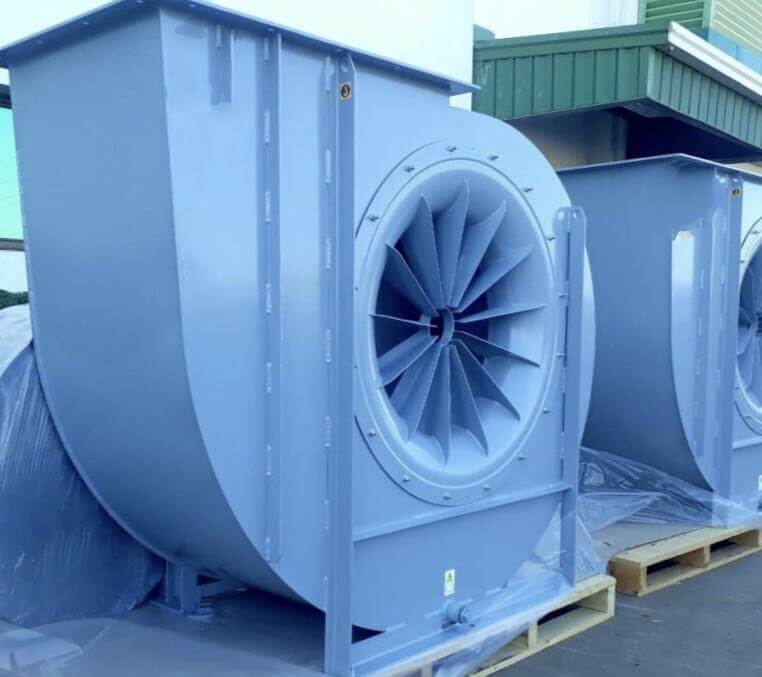
Centrifugal Fan Maintenance Checklist - Daily, Weekly, Monthly & Annual Tasks
When a centrifugal fan fails unexpectedly, it can stop a production line, a dust collection system, or a scrubber. Most of those failures give warning signs for weeks: a slow rise in vibration, a bearing running warmer than it used to, a belt that has started to glaze. This checklist shows what to inspect, how often, and what a problem looks like, so you can catch issues while they are still planned repairs.
In this guide
- A safety procedure to complete before touching any fan
- A maintenance schedule by interval (daily to annual)
- Detailed inspection steps for the housing, impeller, bearings, belts, motor and controls
- A symptom-to-cause troubleshooting table
- How to think about maintenance cost, and answers to common questions
Before You Start: Tagout and Safe Access
Never inspect or service a fan that can start or turn. Before any hands-on work:
- Isolate and lock out all energy sources. Follow your site’s lockout/tagout procedure, which for most U.S. facilities must meet OSHA’s Control of Hazardous Energy standard (29 CFR 1910.147). This includes the motor disconnect and any VFD or control power.
- Confirm the impeller has stopped. Airflow in connected ductwork can keep an idle wheel turning (“windmilling”). Block or damper the duct if needed.
- Check the airstream. If the fan handles combustible dust, fumes, or corrosive or toxic gases, purge and ventilate the system and confirm the atmosphere is safe before opening access doors.
- Treat the housing as a confined space if anyone must enter it. Entry requires your site’s confined space permit process (see OSHA 29 CFR 1910.146).
- Verify guards. Belt and shaft guards must be in place when the fan is returned to service.
If you handle combustible dust, also review our guide to dust collector explosions and make sure your fan construction and maintenance practices suit the hazard.
Centrifugal Fan Maintenance Schedule at a Glance
Use this table as a starting point. Intervals should be adjusted for your fan’s duty cycle, temperature, and how dirty or corrosive the airstream is, and your fan manufacturer’s instructions always take priority.
Interval | Task | What to look for |
Daily / each shift | Walk-around check by ear, eye and hand | New noise, visible vibration, leaks, smell of hot insulation or burning rubber, abnormal airflow |
Weekly | Check motor and bearing temperatures; check gauges and differential pressure | Readings that differ from your recorded normal values |
Monthly | Inspect belts, guards and sheaves; check bearing lubrication; inspect inlet, outlet and damper operation | Belt cracking or glazing, loose guards, grease purge, blocked inlets, sticking dampers |
Quarterly | Vibration measurement and trending; check fasteners and isolators; inspect impeller through access door | Rising vibration trend, loose bolts, buildup or erosion on the wheel |
Semi-annual | Check shaft alignment (direct or coupled drives) and sheave alignment (belt drives); inspect shaft seals | Misalignment, seal leakage or wear |
Annual | Full impeller and housing inspection; motor electrical testing; control and safety device test; review of records | Cracks, corrosion, motor current vs. nameplate, insulation resistance, trip-test results |
Tip: record a “normal” baseline for vibration, bearing temperature, motor current and differential pressure when the fan is new or freshly serviced. Every later reading is judged against that baseline.
Detailed Inspection Steps
1. Fan Housing and Ductwork
With the fan locked out, inspect the scroll housing, inlet cone, access doors, and connected ductwork.
- Look for cracks (especially at welds and stiffeners), corrosion, dents, and thinning from erosion.
- Confirm the housing and base are securely anchored, and that foundation or anchor bolts are tight.
- Check flexible connections for tears or stiffening, and verify they are not carrying the weight of the ductwork.
- Check gaskets and access door seals for air leaks.
- Clear the inlet and outlet of debris, and check ducts for blockages, collapsed sections, or closed dampers.
2. Impeller (Wheel)
The impeller is the heart of the fan, and buildup or damage here is the most common cause of vibration.
- Inspect every blade, the backplate, and the inlet ring for cracks, bends, erosion, and corrosion.
- Look for material buildup. Uneven deposits shift the balance and lower airflow.
- Check that the wheel is tight on the shaft and that hub set screws, keys, and bushings are secure.
- Check the clearance between the wheel and inlet cone against the manufacturer’s specification. Rubbing is a red flag.
- If you clean the wheel, remove deposits evenly and avoid knocking off factory balance weights.
Fan type and maintenance: wheel design affects how a fan behaves in dirty service. Radial-blade and radial-tip wheels tolerate particulate-laden air better and are easier to clean. Backward-inclined and airfoil wheels are more efficient in clean air but are more prone to buildup and erosion when handling dust.
3. Bearings and Lubrication
Bearing problems are among the most common causes of centrifugal fan failures.
- Use the lubricant type and quantity specified in the fan’s manual. Do not mix incompatible greases.
- Follow the manufacturer’s relubrication interval. Fans that run hot, fast, wet or in dusty environments generally need more frequent attention than fans in clean, moderate service.
- Add grease slowly and in small amounts. Over-greasing is a common cause of overheating, seal damage, and early bearing failure, so more is not better.
- Check bearing housing temperature with a contact thermometer or infrared gun, and compare it to your baseline. A sudden or steady rise is more informative than any single number.
- Listen for rumbling, grinding or squealing, and look for lubricant leaks or discolored housings.
4. Belts, Sheaves and Drive Alignment (Belt-Driven Fans)
For a deeper comparison of drive types, see our article on belt-drive vs. direct-drive industrial fans.
- Inspect belts for cracking, glazing, fraying, oil contamination, and uneven wear.
- Check tension using a belt tension gauge or the deflection method specified by the belt manufacturer. Too loose causes slip, heat, and lost airflow. Too tight overloads the bearings.
- Check sheave alignment with a straightedge or laser alignment tool, and inspect grooves for wear.
- Replace multi-belt drives as a matched set, never one belt at a time.
- Re-check tension after the first day or so of operation on new belts, as they stretch as they seat.
5. Couplings and Shaft Alignment (Direct or Coupled Drives)
- Inspect couplings for wear, cracked elements, and loose hardware.
- Check motor-to-fan shaft alignment using a dial indicator or laser tool. Misalignment is a leading cause of bearing and coupling damage and shows up as vibration at specific frequencies.
- Re-check alignment after any motor or bearing replacement.
6. Vibration Analysis
Vibration measurement is the best early-warning tool for a centrifugal fan.
- Measure at each bearing in the horizontal, vertical, and axial directions using the same points every time.
- Compare readings to your baseline and to the limits in your fan’s documentation. ISO 14694 provides recommended vibration limits by fan application category, and AMCA 204 covers balance quality grades.
- Trend the data. A slow upward trend usually points to buildup, wear, or looseness, and a sudden jump points to a damaged blade, lost balance weight, or a failing bearing.
- Use frequency analysis (FFT) where possible. Imbalance, misalignment, looseness, and bearing faults each have recognizable signatures.
If noise is also an issue, our industrial fan noise diagnosis guide can help you separate aerodynamic noise from mechanical problems.
7. Vibration Isolators and Mounting
- Check springs or pads for collapse, cracking, and corrosion.
- Make sure the fan base sits level and that isolators are evenly loaded.
- Check that flexible connectors and restraints are not short-circuiting the isolation.
For more, see vibration isolation in HVAC systems.
8. Motor and Electrical Connections
- Tighten and inspect all terminal connections, and look for discoloration, corrosion and heat damage. Thermal imaging is an efficient way to find hot connections.
- Measure running current and compare it to the motor nameplate full-load amps and your baseline. High current can point to a clogged filter, a binding wheel, or an overspeed condition. Low current can mean slipping belts or restricted flow.
- Keep motor cooling fins and vents clean.
- At least annually, test motor winding insulation resistance (megger test) following your electrical maintenance procedure.
- If the fan runs on a VFD, check drive settings, cooling and fault logs, and confirm that operation avoids known resonant speeds.
9. Dampers, Inlet Vanes and Airflow Controls
- Check that dampers and inlet vanes move freely through their full range and that actuator linkages are tight.
- Confirm that position indicators match actual position.
- Check differential pressure and flow readings. A change from normal at the same damper position is an early sign of a clogged filter, ductwork problem or fan wear.
10. Shaft Seals
- Inspect shaft seals for leakage, wear, and heat marks, especially where the fan handles hot, corrosive, or hazardous gases.
- Replace seals as part of any bearing service.
11. Safety Devices and Controls
Fans are often installed in hazardous environments, so test safety devices rather than assuming they work.
- Test emergency stop buttons and local disconnects.
- Test overload, overtemperature, and vibration trip devices and confirm alarms reach the control room.
- Confirm interlocks with dampers, dust collectors or process equipment operate in the correct sequence.
- Verify that guards, warning labels and access door fasteners are in place.
Troubleshooting: What the Symptom Is Telling You
Symptom | Common causes | What to check first |
High vibration | Buildup or erosion on the impeller, lost balance weight, loose mounting, misalignment, worn bearings | Inspect and clean the wheel, check anchor bolts and alignment, review the vibration spectrum |
Overheating bearing | Over- or under-lubrication, wrong lubricant, misalignment, belt over-tension, contamination | Review lubrication records, check belt tension and alignment |
Low airflow | Clogged filters or ducts, belt slip, closed damper, wrong rotation, worn or fouled wheel | Check rotation, belt condition, damper position and differential pressure |
High motor current | Dirty or binding wheel, overspeed, increased system resistance changes, failing bearing | Compare to nameplate amps, check wheel clearance and speed |
Unusual noise | Bearing damage, rubbing wheel, loose parts, airflow instability, resonance | Isolate mechanical vs. aerodynamic noise, inspect clearances |
Belt squeal or short belt life | Low tension, misaligned sheaves, worn grooves, contamination | Check tension, alignment and sheave wear |
Preventive Maintenance Program Essentials
A checklist only works when it is part of a program.
- Build a schedule and assign owners. Put every recurring task in your CMMS or maintenance calendar with a named responsible person.
- Keep records. Log vibration, temperature, current, lubrication, parts replaced and findings for each fan. Trends in this data are what let you predict failures.
- Train operators. Operators who walk past the fan every shift are your best sensors. Teach them what normal sounds, feels and looks like, and who to call when it changes.
- Stock critical spares. Belts, a set of bearings, seals, and a spare sheave or coupling element can turn a multi-day outage into a few hours. See our guide to emergency replacement parts for fans and blowers.
- Get installation right. Many chronic problems trace back to installation. Our centrifugal fan installation checklist covers alignment, foundations, and ductwork connections.
- Review system changes. If airflow, speed, or process conditions change, the fan’s operating point changes too. Our guide to the fan affinity laws shows how speed changes affect flow, pressure, and power.
What Does Centrifugal Fan Maintenance Cost?
There is no single number, because cost depends on factors specific to each installation:
- Fan type and size. Larger fans and specialty constructions (stainless steel, FRP, spark-resistant) cost more to inspect and repair.
- Operating environment. Dust, moisture, corrosive gases, and high temperatures all shorten service intervals.
- Duty cycle. A fan running 24/7 accumulates wear much faster than one running a single shift.
- Age and condition. Older fans typically need more attention, and at some point replacement is more economical than repair.
- Maintenance strategy. Run-to-failure, calendar-based, and condition-based programs have very different cost profiles.
A useful way to evaluate cost is to compare it with the cost of failure. Use this simple formula:
Cost of an unplanned failure = (hours of downtime × cost of lost production per hour) + emergency repair costs + expedited parts and labor
For example (illustrative numbers only): if a failed fan stops a line for 12 hours at $5,000 per hour of lost output, the downtime alone is $60,000, before repair costs. A planned bearing replacement during a scheduled shutdown might cost a small fraction of that. Plug in your own figures to see where preventive maintenance pays off.
Need Help With Your Fans?
Atmax Filtration supplies and supports industrial centrifugal fans, blowers, and related equipment for demanding applications. Our team can help with replacement parts, fan selection, and troubleshooting.
- Browse our centrifugal fans and blowers, and stainless steel centrifugal fans
- Learn about our services
- Request a quote or contact our team at sales@atmaxfiltration.com
Related Guides
- Complete Guide for Axial Fan Maintenance
- Axial Fans vs. Centrifugal Fans
- How to Size a Centrifugal Fan for Your Facility
- Guide to Fan Rotation and Discharge Direction
References and Further Reading
- OSHA, Control of Hazardous Energy (Lockout/Tagout), 29 CFR 1910.147
- OSHA, Permit-Required Confined Spaces, 29 CFR 1910.146
- ISO 14694, Fans: Specifications for balance quality and vibration levels
- AMCA Publication 204, Balance Quality and Vibration Levels for Fans
- U.S. Department of Energy, Improving Fan System Performance: A Sourcebook for Industry
- Your fan manufacturer’s installation, operation and maintenance (IOM) manual
Disclaimer: This checklist is general guidance. Always follow the fan manufacturer’s instructions, applicable codes, and your site’s safety procedures.
Frequently Asked Questions
There is no single answer, but a typical program includes daily visual and audible checks, monthly belt and lubrication checks, quarterly vibration measurement, and a full inspection annually. Dirty, hot, corrosive, or continuous-duty applications need shorter intervals. Always follow the manufacturer’s manual as the baseline.
The most common warning signs are increased vibration, new or louder noise, a drop in airflow or pressure, a rise in motor current or bearing temperature, burning smells, and visible dust or lubricant leaks.
Use a belt tension gauge or the deflection method recommended by the belt manufacturer. Measure at the midpoint of the belt span, compare to the specified force and deflection, and re-check after new belts have run in.
The most frequent causes are material buildup or erosion on the impeller, loose mounting or anchor bolts, shaft or sheave misalignment, and worn bearings. A vibration spectrum helps pinpoint which one you have.
No. Cleaning must be done with the fan fully locked out and the wheel at rest.
It depends on the extent of the damage, parts availability, and the existing unit’s efficiency. If repairs are becoming frequent or the fan no longer suits the process, replacement or a better-matched design may offer lower lifetime cost.